Articles by "best login page with php code"


<!DOCTYPE html>
<head>
<!--Import Google Icon Font-->
<link href="http://fonts.googleapis.com/icon?family=Material+Icons" rel="stylesheet">
<!--Import materialize.css-->
<link type="text/css" rel="stylesheet" href=
"https://cdnjs.cloudflare.com/ajax/libs/materialize/0.100.2/css/materialize.min.css"
media="screen,projection"/>

<!--Let browser know website is optimized for mobile-->
<meta name="viewport" content="width=device-width, initial-scale=1.0"/>
</head>
<style>


.querymine_image {
position: absolute;
width: 100%;
height: 100%;
background-image: url(https://i.imgur.com/HEjyz1R.jpg);
background-size: cover;
background-color: purple;
}
</style>
<body>

<div class="querymine_image"></div>

<div class="row">
<div class="col l6 offset-l3 s12 m10 offset-m1" >
<div class="card z-depth-3" style="background-color:rgba(0, 0, 0, 0); margin-top: 15%;">
<div class="card-action">
<h3 class="center white-text">
Login Form
</h3>
</div>
<div class="card-content">
<form action="" method="GET">
<div class="input-field">
<i class="material-icons prefix ">person</i>
<input type="text" name="username" id="username">
<label for="username">Username</label>
</div>
<div class="input-field">
<i class="material-icons prefix">lock</i>
<input type="password" name="password" id="password">
<label for="password">Password</label>
</div>

<input type="checkbox" name="" id="checkbox">
<label for="checkbox">Remember Me</label>

<div class="center">
<button type="submit" name="" id="" class="btn btn-large transparent red-text">Login</button>
</div>
</form>
</div>
</div>
</div>
</div>


<!--Import jQuery before materialize.js-->
<script type="text/javascript"
src="https://code.jquery.com/jquery-2.1.1.min.js">
</script>
<script type="text/javascript"
src="https://cdnjs.cloudflare.com/ajax/libs/materialize/0.100.2/js/materialize.min.js">
</script>
</body>
</html>

<!DOCTYPE html>
<html>
<head>
<!--Import Google Icon Font-->
<link href="http://fonts.googleapis.com/icon?family=Material+Icons" rel="stylesheet">
<!--Import materialize.css-->
<link type="text/css" rel="stylesheet" href=
"https://cdnjs.cloudflare.com/ajax/libs/materialize/0.100.2/css/materialize.min.css"
media="screen,projection"/>

<!--Let browser know website is optimized for mobile-->
<meta name="viewport" content="width=device-width, initial-scale=1.0"/>
<style>
.querymine_image {

position: absolute;

width: 100%;

height: 100%;

background-image: url(https://i.imgur.com/HEjyz1R.jpg);

background-size: cover;

background-color: purple;

}
</style>
</head>

<body>
<div class="querymine_image"></div>
<div class="row">
<div class="col l4 offset-l4 m12 s12" style="opacity:0.8;padding-top:2%;">
<div class="card-panel z-depth-4 border-radius-6 " style="border-radius: 8px; ">
<h5 class>Register</h5>
<p>Join to our community now !</p>
<div class="input-field">
<i class="material-icons prefix">person</i>
<input type="text" name="username" id="username">
<label for="username">Username</label>
</div>
<div class="input-field">
<i class="material-icons prefix">email</i>
<input type="text" name="email" id="email">
<label for="email">Email</label>
</div>
<div class="input-field">
<i class="material-icons prefix">lock</i>
<input type="password" name="password" id="password">
<label for="password">Password</label>
</div>
<div class="input-field">
<i class="material-icons prefix">lock</i>
<input type="text" name="password2" id="password2">
<label for="password2">Password Again</label>
</div>
<br> <div class="center" >
<input type="submit" name="" id="" value="Register" class="btn waves-effect waves-light" style="width:100%; border-radius: 25px;">

</div>
<br>
<div class="">
<a href="index.html" class="left" style="font-size:12px;">Already have an account ? Login</a>
</div>
<br>
</div>
</div>
</div>
<!--Import jQuery before materialize.js-->
<script type="text/javascript" src="https://cdnjs.cloudflare.com/ajax/libs/materialize/0.100.2/js/materialize.min.js"></script>
</body>
</html>


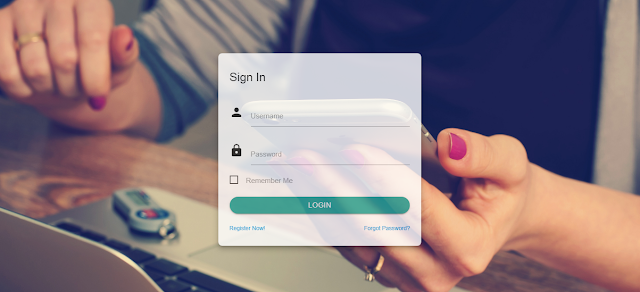
<!DOCTYPE html>
<html>
<head>
<!--Import Google Icon Font-->
<link href="http://fonts.googleapis.com/icon?family=Material+Icons" rel="stylesheet">
<!--Import materialize.css-->
<link type="text/css" rel="stylesheet" href=
"https://cdnjs.cloudflare.com/ajax/libs/materialize/0.100.2/css/materialize.min.css"
media="screen,projection"/>
<!--Let browser know website is optimized for mobile-->
<meta name="viewport" content="width=device-width, initial-scale=1.0"/>
<style>
.querymine_image {
position: absolute;

width: 100%;

height: 100%;

background-image: url(https://i.imgur.com/HEjyz1R.jpg);

background-size: cover;

background-color: purple;

}
</style>
</head>
<body>
<div class="querymine_image">
</div>
<div class="row">
<div class="col l4 offset-l4 m12 s12 " style="opacity:0.8;padding-top:8%;">
<div class="card-panel z-depth-4 border-radius-6 " style="border-radius: 8px; ">
<form action="" method="post">
<h5 class>Sign In</h5>
<br>
<div class="input-field">
<i class="material-icons prefix">person</i>
<input type="text" name="username" id="username">
<label for="username">Username</label>
</div>
<div class="input-field">
<i class="material-icons prefix">lock</i>
<input type="text" name="password" id="password">
<label for="password">Password</label>
</div>
<input type="checkbox" name="checkbox" id="checkbox">
<label for="checkbox">Remember Me</label><br>
<br> <div class="center" >
<button type="submit" name="login" id="" value="Login" class="btn waves-effect waves-light " style="width:100%; border-radius: 25px;">Login</button>
</div>
<br>
<div class="">
<a href="register.html" class="left" style="font-size:12px;">Register Now!</a>
</div>
<div class="margin medium-small" style="font-size:12px;">
<a href="" class="right">Forgot Password?</a>
</div>
<br>
</form>
</div>
</div>
</div>
<!--Import jQuery before materialize.js-->
<script type="text/javascript" src="https://cdnjs.cloudflare.com/ajax/libs/materialize/0.100.2/js/materialize.min.js"></script>
</body>
</html>

Gallery

[QUERYMINE][gallery2][recent][10]

Contact Form

Name

Email *

Message *

Powered by Blogger.
Javascript DisablePlease Enable Javascript To See All Widget